
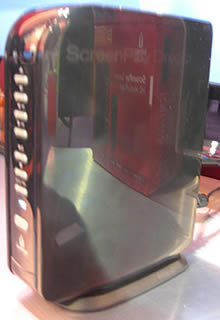
The new Iomega Screenplay Director HD media player is an internet TV and home network set top box that offers HD online movies, YouTube & web TV, and access to media stored on devices on your home network.
The device replaces the old Screenplay TV link which came out in 2008. I got a hands-on look at the new media box while at CES 2010 and it certainly delivers on what it promises with a very reasonable price tag.
You can watch HD movies purchased or rented from Cinema Now, an online movie rental service similar to iTunes and Amazon Video-on-Demand.
Other online content includes YouTube, Flickr, Internet radio, RSS feeds, or podcasts, all accessible through the easy-to-use user interface and remote. Check out the GUI in the video below:
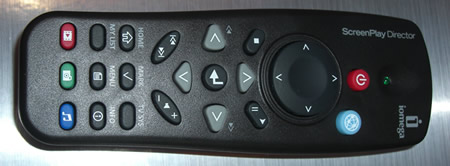
It also comes with a healthy 1TB internal drive and uou can also hook up additional storage via the 3 USB ports.
Home Network Media
The HD Media Player also gives you access to videos and media on your home network in a wide variety formats.
It can connect via Ethernet or Wi-Fi and has DLNA support making watching videos across your home network relatively seamless.
Unfortunately for WI-FI wireless access you’ll need to purchase the Iomega 802.11n Wireless Adapter separately or one of the following supported USB Wi-Fi devices which can be hard to get hold of:
- Trendnet TEW424UB (USB)
- Edimax EW-7316UG (11g USB)
- Encore ENUWI-G (USB dongle)
You could try your luck with another USB Wi-Fi device but quite often they’ve been reported not to work.
Wi-Fi networks tend be a bit sluggish for copying large files and playing HD anyway so you may want to look into a home plug adapter or CoAX adapter to extend your internet connection. These are usually offer a faster and more reliable connection compared to Wi-Fi, but are more expensive.
Full Specs
 Media Formats
- Audio Formats – MP3, AC3 (Dolby® Digital Encoding), WAV, OGG, WMA
- Video Formats – MPEG-1, MPEG-2 (AVI/VOB), MPEG-4 (AVI/DivX®/XViD), H.264, WMV, AVCHD
- Photo Formats – JPEG, BMP, GIF, PNG and TIFF
- File Types – .mkv, .avi, .asf, .iso, .vob, .mp4, .mov, .wmv, .flv, .ifo
- PAL/NTSC – Full 1080p high definition (24 fps)
- AV Connections – HDMI, Composite video and audio R/L; Component video: Y, Pb, Pr, optical audio
- Hard drive format: NTFS (default), FAT32
Interfaces
- 1 x RCA Component Video Out – Rear
- 1 x Composite Video Out – Rear
- 1 x Stereo Audio Line Out – Rear
- 1 x HDMI Digital Audio/Video Out – Rear
- 1 x RJ-45 Network – Rear
- 3 x USB – Rear
- 1 x Toslink S/PDIF Out – Rear
- EthernetWireless
- IEEE 802.11b/g/n
- DLNA support
Other
- Versatile Supports many CODECs and file types including H.264 so you can enjoy your entire media collection
- Access online content on internet sites such as YouTube, Flickr, Internet radio, RSS feeds, or podcastsLarge capacity
- Save up to 1500 hours of video, 4,000,000 photos,or 18,500 hours of music on the 1 TB drive
- DivX Home Theatre Certified Includes Iomega Protection Suite anti-virus and backup software solutions
Pros
- Full HD support
- Supports lots of file formats
- 1TB storage included
- Rent movies online and YouTube access
Cons
- Needs separate adapter for Wi-Fi support
- Would like to see more online TV and internet features
Bottom Line
Retailing at $250 the Iomega Screenplay Director HD (model number 34650) is a healthy price when you consider the 1TB storage included (an external Iomega 1TB hard drive is typically $100 or more).
With full HD support, ability to watch videos on the home network, and online TV, movie rentals and internet functions it has a good amount to offer. Lack of built-in Wi-Fi is a real shame though.
Iomega Screenplay Director HD Marketplace – Deals & Discounts
On Amazon:
Buy it on Amazon.
On eBay:
 |
US $.99 1 Bid |

Also See
- The Monsoon Volcano which offers internet TV, placeshifting, home network media playing and more.
- More Internet TV Set Top Boxes
- Homeplug Ethernet Adapters on eBay

The ZeeVee ZvBox allows you to watch streaming online content from your computer on your home HDTV with a remote control.
What the ZeeVee System is All About
ZeeVee ZvBox allows you to stream any HD content from your computer to your HDTVs. It’s a clever system in which the computer broadcasts into the television via an unused cable channel.
Once running, you can basically sit on your couch and use the ZeeVee remote to view online content from your PC. Various sources of ZeeVee ZvBox content from your computer can include:
- Streaming television content from major networks, most in HD (e.g. shows from ABC online like ‘Lost’)
- Movie download services, like NetFlix and iTunes
- The computer’s DVD player, that can be controlled by the remote with any of your HDTVs
- Content from YouTube and BitTorrent peer-to-peer sites
- etc.
Using the ZeeVee System
Using the remote control with the system, surfing the web becomes a lot easier. The ZvBox gives you access to watching any number of online TV shows and films, stream music with iTunes, browse the web or even check your email. Being able to do this from your HDTV is a convenient novelty.

Setup seems pretty straight-forward: Your computer basically just needs to be hooked up to your existing in-home TV cable wiring, and doesn’t interfere with regular cable-based broadband services.
Video Review of the ZeeVee ZvBox
Online Reviews of the ZeeVee ZvBox
The reviews I read were more or less favorable to this system. PC Magazine praised the device’s ability to display high-definition video from PCs to TVs throughout your house, with no limitations or monthly fees, but they also ripped into the expensive of the system and the complex setup required, as well as the fact that the system isn’t compatable with Mac and Linux.
Reviews from CNET said mostly the same thing, that the system is good in that you can watch web or tv-based video around the house on multiple TVs, but also noted the expensive price as well as it’s setup complexity.
Specs
- USB: USB V2, full speed and high speed, Type B connector
- VGA1: High-density 15-pin male DSUB
- VGA2: High-density 15-pin male DSUB
- Cable: F-type female cable TV
- Compatible TVs: HDTV with digital cable ready tuner
- Compatible Computers: Fully tested and qualified for the PC. Mac not supported at this time
- Audio: PCM and Dolby Digital 5.1 Surround Sound over USB
- Video Input: VGA (or DVI-A connectors with VGA adaptor)
- Video Output: Up to full HD (1080i)
- Localcasting: RF modulation
- Encoding: MPEG-2
- Operating System: Microsoft Windows XP with Service Pack 2; Microsoft Windows Vista
- Processor: 2 Ghz CPU
- Memory: 2 GB DRAM
- Disk space: 50 MB
- USB: Two free USB 1.0 or 2.0, high-speed or full speed ports
ZeeVee ZvBox – Prices, Deals and Discounts
On Amazon:
Available to buy at Amazon
On eBay:
 |
US $999.01 |

You Might Also Be Interested In
]]>
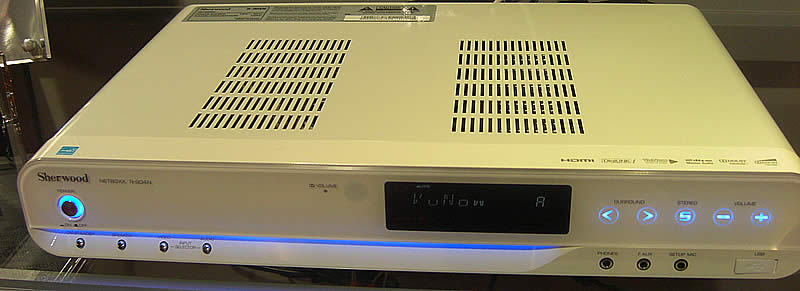
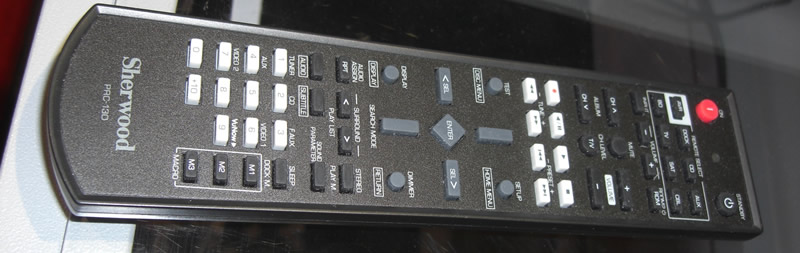
Sherwood is better known for its high quality audio equipment, but it has recently crossed over into the Internet set-top-box space mixing high quality audio and high definition internet TV.
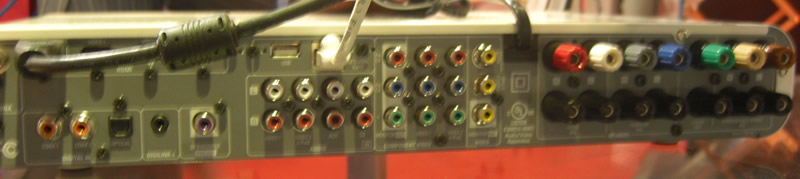
As an amplifier the Sherwood box packs the goods with 700 watts of amplification, a pair of coaxial audio inputs, three HDMI 1.3 inputs, one Toslink input, and support for Dolby Volume, Dolby TruHD and DTS-HD Master high-res audio formats.
Hate those excessively loud adverts? Well the Netboxx also has Dolby Volume which eliminates volume fluctuations between channels, commercials and between Internet sites.
It also has an FM radio tuner built in.
So it’s got sound covered, but what can it play?
Internet TV
The Netboxx can connect directly to the internet via Ethernet or wireless connection and gives you access to a suite of online video content.
- Search and watch videos from the major video sites including YouTube, Daily Motion and Myspace.
- Rent and buy online movies to download from Cinema Now
- A variety of video and live stream from various websites.
- Shoutcast support for online radio.
PlayOn Support
That’s not a bad round-up of online video content to start with but the NetBoxx also supports PlayOn. For an extra $40 for the third party PlayOn service you can get access to Hulu, Netflix, CBS, CNN, ESPN, and Amazon Video On Demand.
The NetBoxx is designed for use with PlayOn and it works directly from the user interface on your TV.
While at CES 2010 I managed to get to check out the NetBoxx in action:
Revision3 also had a hands on look:
Local Media
With UPnP and DLNA support the Netboxx can play content on your TV from a variety of compatible sources in your home network. In plain English that means you can play videos, pictures and music off laptops, computers, and Network Attached Storage (NAS) on your home network.
It will also play media off a storage device you attach via USB.
It doesn’t play well with iTunes however which is typical of non-Apple media centers, and to play from a PC it uses the Windows Media Player library.
No Hard Drive or DVR
There’s no mention of a hard drive meaning you’ll need to rely on external storage devices for your media collection.
With USB hard drives been relatively cheap this is not a big deal, but it does mean there’s no DVR functionality. So recording your favorite TV shows from satellite or cable is out of the question with this device.
If you already have a DVR then the NetBoxx will hook up with it allowing you to play recordings off your DVR and give you much better sound quality through it’s amp.
NetBoxx Features Roundup
- Connects to the Internet without a PC for video, audio and media streaming
- Content available from You Tube, Cinema Now, on-line TV channels, Shoutcast “Internet Radio”, etc.
- Supports PlayOn to stream Hulu, Netflix, CBS, CNN, ESPN, Amazon Video On Demand and more from a local network
- Streams audio, video and photo media files from a local network direct to the receiver
- High-performance audio/video in a new, highly compact form factor
- HDMI 1.3, Dolby and DTS Lossless Audio for the highest quality sound
- Dolby Volume eliminates volume fluctuations between channels, commercials and between Internet sites
- High-efficiency “Green” Ti digital amplifiers
■AMPLIFIER SECTION
• Power output, stereo mode, 6 Ω, THD 0.5%, 1 kHz | 2× 100 W
• Total harmonic distortion at -3 dB, 6 Ω, 1 kHz | 0.5%
• Input sensitivity/impedance
Line (CD, AUX, VIDEO) | 200 mV/47kΩ
• Signal to noise ratio, IHF “A” weighted
Line (CD, AUX, VIDEO) | 100 dB
• Frequency response
Line (CD, AUX, VIDEO), 20 Hz ~ 70 kHz | +0, -3 dB
• Bass/Treble control, 100 Hz/10 kHz | ±10 dB
• Surround mode, only channel driven
Front power output, 6 Ω, 1 kHz, THD 0.7 % | 100 W / 100 W
Center power output, 6 Ω, 1 kHz, THD 0.7 % | 100 W
Surround power output, 6 Ω, 1 kHz, THD 0.7 % | 100 W / 100 W
Surround back / ROOM2 power output, 6 Ω, 1 kHz, THD 0.7 % | 100 W / 100 W
■DIGITAL AUDIO SECTION
• Sampling frequency | 32, 44.1, 48, 96, 192 kHz
• Digital input level
Coaxial, 75 Ω | 0.5 Vp-p
Optical, 660 nm | -15 ~ -21 dBm
■VIDEO SECTION
• Video format | NTSC
• Input sensitivity(=Output level), 75 Ω
Video (Composite(normal)) | 1 Vp-p
Component video (R-Y signal) | 0.5 Vp-p
(B-Y signal) | 0.5 Vp-p
(Y signal) | 1.0 Vp-p
• HDMI connector | 19 pin
■FM TUNER SECTION
• Tuning frequency range | 87.5~107.9 MHz
• Usable sensitivity, THD 3%, S/N 30 dB | 9 dBf
• 50 dB quieting sensitivity, mono/stereo | 20.2 / 45.3 dBf
• Signal to noise ratio, 65 dBf, mono/stereo | 70 / 65 dB
• Total harmonic distortion, 65 dBf,1 kHz, mono/stereo | 0.8 / 1.0 %
• Frequency response, 30 Hz~15 kHz | ±3 dB
• Stereo separation, 1 kHz | 30 dB
• IF rejection ratio | 70 dB
■GENERAL
• Power supply | 120 V ~ 60 Hz
• Power consumption | 120 W
• Dimensions (W× H× D, including protruding parts) | 430 x 72 x 306 mm(17 x 2-7/8 x 12 inches)
• Weight (Net) | 4.58 kg (10.1 Ibs)
The Pros
- Great audio support
- Good selection of online content, especially with PlayTV
- Share media on home network via DLNA or UPnP
- Easy to use user-interface
- FM Radio support
The Cons
- No hard drive
- Only 720p HD
- Expensive
- No DVR functionality
- Not Mac or iTunes friendly.
The Bottom Line
The Sherwood retails for $650 but you can pick it up on for under $600 on eBay (see auctions below). Also bear in mind the additional $40 one-off cost for the PlayOn service for the extra
I’ve got mixed feelings about the device, I wonder if it would be better to buy the Monsoon Volcano and get a decent amplifier separate – then you’ve almost got everything the Netboxx can do and more, including a DVR. You’d just be missing the PlayOn support (which is a big deal for Hulu fans), but the Volcano may add that as an app later.
The ideal situation for the NetBoxx would be if you don’t care about cable TV (so don’t need a DVR), use windows PCs, and want awesome sound quality and lots of online TV. If you already have a DVR then the NetBoxx would also be a great choice to boost your sound and brind internet TV to the living room.
Available on eBay:
 |
US $349.00 |
Also See:
- The PopBox HD – An low-cost internet TV set top box.
- More internet TV set top boxes on WebTVWire
- More Sherwood products on eBay

A new promising placeshifting device with the potential to become the ultimate all-in-one home TV device is due for launch in March 2010.
The ‘Volcano’ from Monsoon Multimedia (the makers of the HAVA placeshifting line) is WebTVWire’s favorite device from the 2010 Consumer Electronics Show. Quite simply this slimline set top box is packed with a variety of promising features.
It is essentially does all of the following:
- HD placeshifter – Allows you to view 720p high definition streams of your home Cable TV connection and home video library over the internet.
- DVR – Plug in your cable box or other TV source and you have the typical DVR functions of recording and playing TV.
- Internet TV – Right not its YouTube for online video and CinemaNow for paid movies. In the works are many other web TV services including Boxee and Netflix.
- Apps – The device should also allow you to play on Twitter and Facebook as well as do a lot of other stuff like play games and check the weather through third-party apps.
- Live Broadcast - It can even broadcast video from your home live across the internet.
- Home Network Media – Access and share video and media across your home network wired or wirelessly.
Soak up some pics and watch a video of it in action…



An Internet TV Set Top Box
In addition to placeshifting the device also tries to be an internet enabled set top box like the Roku. It can play a variety of content including videos from YouTube and on-demand movies from CinemaNow.
Simply putting YouTube on the TV screen will make a lot of people happy, and makes the PopBox, which lacks YouTube streaming, look a lot less appealing when this slim little box can access the biggest video site on Earth.
Digital Video Recorder
Monsoon describe the DVR feature as being akin to TiVo with a recommendation engine that records your favorite TV for you. The typical DVR features of pausing and rewinding live TV are also present.
It doesn’t come with an internal tuner so you will need to hook it up to your cable box or other TV source. Lacking a tuner will mean that you probably won’t be able to record and play different TV stations at the same time.
The DVR can also be accessed remotely so you can manage your recording schedule.
A Media Extender
It doesn’t end there however! The Volcano can also play videos off local storage media via USB, eSATA and UPnP. It even crosses into media extender territory with support for DLNA meaning it can access DLNA compatible devices on the home network.
It can also stream files over a home network over UPnP, and video streaming in this fashion is also planned.
To be clear you can both access media on other devices and play them, and other devices can access the Volcano and play the media stored on it.
App Crazy
Monsoon is very keen on getting as many apps for the Volcano as possible. Already guaranteed for launch are YouTube and CinemaNow, but also planned is Twitter, Netflix, Facebook, Last.fm, Boxee and many more.
App production is open to third party developers.
A TiVoToGO-esque Function
No it doesn’t stop there either! You can copy videos from an attached set-top-box (say your recorded programs on your DVR) and quickly export them to external media, or the integrated storage that is planned on later models. This is a bit like TiVoToGo.
A Placeshifter
Simply connect to your home theater using the software available ot PC, Max OS X, iPhone, Symbian, or Windows Mobile smartphone.
To stream content over the net it uses a 150kbps uplink speed, as well as H.264 video compression technology developed by Monsoon
A Live Broadcaster – aka SlingCatcher
Also planned for the Volcano is the ability to stream live (or recorded) video from your home across the internet. This is what the SlingCatcher does.
If the Volcano can pull all this off it will be a media extender, Slingbox, SlingCatcher, Internet TV set-top-box & TiVoToGo machine all in-one!
Monsoon looks set to take the place of Slingmedia as the innovative company coming out with ground-breaking disruptive technology. Slingmedia seems to have lost its disruptive passion when it was taken over by Echostar (aka DISH Network).
Volcano Features Overview
- All-in-One video convergence device combines major features of TiVo, Slingbox/HAVA, Roku and Remote DVR features for a fraction of the cost
- High-quality video playback
- Includes hardware remote control; smartphones and computers have on-screen remotes
- Free app with EPG supports Windows, Mac, Linux, iPhone, Blackberry, Android, Symbian and Windows Mobile smartphones
- Streams high-quality video at H.264 and MPEG-4 standards at 150kbps
- Enables full remote control and channel changing capabilities of any TV source such as Cable, Satellite, DVD or TiVo
- Wireless N for video uplink and broadcast throughout the home
- Smooth video over 3G as well as Wi-Fi
- Browse EPG for schedules, series and episode descriptions
- Built in infrared to control set-top box remotely
- Multiple users can have recordings on the Volcano hard-drive and access them independently
GUI Let Down?
According to Dave Zatz the GUI is a little rough around the edges so usability could be an issue, although Monsoon did say the interface is stll being worked on and improved. The media interface is Cover Flow-esque (like how you browse albums on the iPod) which looks promising.
The box design however is certainly very sleek (pictures coming shortly), it is a thin black design with a healthy selection of inputs and outputs on the back.
How Much?
The Volcano is expected in March in a 4GB flash memory version for $199. A Pro edition will also be sold for $299 which features a more healthy 250GB drive. A lifetime or term-based subscription will also be needed, but details on this have not yet been released.
Buy Monsoon Volcano
As soon as the Monsoon Volcano is available to purchase it will be listed here:
No eBay items currently available.
Also See
]]>
2010 will be the year that web TV set-top-boxes start to make it into the mainstream. The recently announced Popbox priced just shy of $130 has received a lot of promising buzz, but does it deliver?
The PopBox is replacing its predecessor, the Popcorn Hour box with newer features and a sleeker interface.
Content Partners
The PopBox has partnered with a number of companies to bring a variety of video. It’ not got everything, but it’s got decent selection to keep you busy.
- Netflix – rent and buy movies instantly.
- Crunchyroll (Asain entertainment site)
- BlipTV – video clips and independent episodes
- NextNewNetworks – independent web TV shows
- Revision3 – independent web TV shows with a tech focus
- Livestation – live TV from various worldwide sources
- Internet Video Archive – archive of public domain video and old movies.
- MalaysiaKini – Malaysian videos
App Innovation Myth?
Apps were certainly big in 2010 on cell phone devices, and Popbox is trying to cash in on the app craze for the set-top-box.
It boasts over 20 apps at launch, but from what I can see some of these are simply content partners like NetFlix and Blip.tv. So I think Popbox is using the definition of apps very loosely.
That said it does give access to:
- IMDB
- Clicker – An Internet TV guide
- FunSpot – Gaming
- SHOUTcast – Web radio
- Eyecon – Media extender to stream media to other devices in the home
- Mediafly – Manage vodcasts and podcasts
- MetaChannels – A video aggregation and distribution service that enables device manufacturers and application developers to integrate the best shows on the Web into their product offerings
- Photobucket – Photo and video sharing
- PicoChannel – Share photos and videos on friends TVs.
- Swarmcast – Broadcast internet video
- Twonky – Media extender to stream media to other devices in the home
- Waterfront Entertainment: – Gaming
- WeatherBug – Control the weather outside your house. No just kidding, just get a weather report.
Apps All That?
It’s a pretty similar idea to Yahoo’s widgets for the TV. There’s certainly a good amount of options in there, but many are probably more than what the average TV watcher needs.
Sure the average viewer might like to check out a bit of web radio, play some games and check on the weather, but they won’t get into the media extenders, video broadcasting or photo sharing.
I can see tweeting from the couch being popular but most hardcore tweeters would have an iPhone or smartphone in hand, which is probably easier to write on than a remote.
I’m guessing the average techie would probably prefer to switch on their Mac, PC or iPhone to share photos, upload video, broadcast live video, tweet and manage vodcasts and podcasts, at least that’s what I’d do.
So I think a few apps may be redundant for both techies and geeks here, but at least the option is there. The shoutcast app for internet radio is certainly a gem, but I’d like to see Last.fm and Spotify in there too, hopefully they are in the works.
The apps and content that I really want to see are lacking though…
No Facebook App – coming Soon?
So with all those apps that most people won’t use, where’s the app that almost everyone would use? Facebook!
Killing hours from the comfort of your front room to browse Facebook would certainly be a hugely popular feature of PopBox, but it is not there.
PopBox told me that a Facebook app is in the works though, which will certainly make this device a lot more appealing. It will likely be available at launch.

No YouTube, No Hulu, No iTunes
When Google realized it could cash in from set-top-boxes it changed the terms and conditions for its API; set-top-boxes could no get access to the YouTube API without prior permission. As a result the Popbox predecessor, like many other internet enabled set-top-boxes, lost access to YouTube.
YouTube is apparently absent from the PopBox so it misses out on the biggest central hub for video. I’m also surprised to see that PopBox hasn’t even gone with some of the secondary video sites like Metacafe, DailyMotion, CollegeHumor and Liveleak.
A whole world of video is completely missing, making the Boxee box and Monsoon Volcano which do have YouTube access look a lot more appealing.
PopBox confirmed to me they do not intend to add YouTube functionality in the future due to the high licensing costs demanded by Google.
Of course Hulu is also missing, but that’s pretty common in the set-top-box world. You can’t expect NewsCorp to be so open to providing content to a new source of viewers without a monthly charge, on top of the advertising.
iTunes has also failed to make the list so this probably is not the device for Apple fans. But anything non-Apple is going to have trouble playing iTunes DRM music as Apple doesn’t like to share.
Hands-On with the PopBox
Jim Louderback, the CEO of Revision3 takes a hands-on look of the PopBox:
Gui & Home Network Streaming

The device itself does earn some style points, a silent black box that’s so cool it doesn’t need a fan. The video processor can handle full HD decoding at 100 megabits per second and a HDMI connection is there as expected.
With USB and SD ports you can hook up external devices for additional media, and many formats are supported.
Media Extender Functionality
Like the Apple TV the device will also allow you to watch anything stored on your home network. Like the Apple TV it has a sweet interface, if not sweeter, and better than the Apple TV its supports a wide host of video formats.
A pleasant and useful feature is when it finds a video to play it can show the DVD cover and information from the Internet Movie Database.
A downside is the interface does have some display ads which is probably why this box comes pretty cheap.
Full Spec List:
Video outputs
HDMI (1080p/720p/480p), Component video (Y/Pb/Pr)
Audio outputs
Stereo analog audio, S/PDIF optical
Video file containers
PEG1/2/4 elementary (M1V, M2V, M4V), MPEG1/2 PS (M2P, MPG, DAT, VOB), MPEG2 Transport Stream (TS, TP, TRP, M2T, M2TS, MTS), AVI, ASF, WMV,
Matroska (MKV), MOV (H.264), MP4, RMP4
Video codecs
XVID SD/HD, MPEG-1, MPEG-2 MP@HL, MPEG-4.2 ASP@L5, 720p, 1-point GMC, MPEG-4.10 (H.264), BP@L3, [email protected], [email protected], [email protected], WMV9, MP@HL, SMPTE 421M (VC-1), MP@HL, AP@L3
Audio file containers
AAC, M4A, MPEG audio (MP1, MP2, MP3, MPA), WAV, WMA, FLAC, OGG
Audio codecs
Dolby Digital, DTS, WMA, WMA Pro, MPEG-1 Layer 1, 2, 3, MPEG-4 AAC-LC,
MPEG-4 HE-AAC, MPEG-4 BSAC, LPCM, FLAC, OGG Vorbis
Photo formats
JPEG, BMP, PNG, GIF
PopBox RoundUp
If you look at this device simply as a media extender to get videos from your PC onto your living room TV, then it’s a good choice given the extra apps and variety of content partners to bring you some online TV content.
However, if you are looking for a full on internet TV set-top-box that gives you access to the most web TV content you can find then then PopBox is falling short until it can bring on some more content partners.
The Popbox will be available in March in the US only, for a recommended price of $129. Given the overall functionality for the price the PopBox is definitely a good deal. eBay deals will appear below once it becomes available:
No eBay items currently available.